Friday, November 30, 2012

Polyvore

Hasil gambar untuk app Polyvore

I’ve heard of Pinterest and Houzz, as has, I suspect, any computer-literate person with even a slight interest in decorating or remodeling. I’ve used both to browse for design ideas and specific products.
But sometimes I would spy something I really liked only to learn there was no manufacturing or purchasing information for it.
I could have saved time with Polyvore, which started in 2007 as a fashion Web site and branched out into home decor in 2013. It’s kind of a mashup of Pinterest, Wanelo (Want, Need, Love) and Houzz; it allows you to create a collage that you — or others — can shop from.
Hasil gambar untuk app Polyvore
It’s less widely known than Pinterest, which has 50 million unique visitors per month (Polyvore has about 20 million). Yet Polyvore has a higher “average order value” (meaning its customers spend more per visit) than Pinterest or the No. 1 social network, Facebook.
It also prides itself on its global flair: More than half of its traffic comes from international users.Here’s how it works: Users put together collages, or “sets,” of products to create a mood board, an outfit or a room.
Hasil gambar untuk app Polyvore
People browsing the sets can click on any item (some from Polyvore itself, some from other Web sites) to go to the place to buy it online.
Companies use it to promote and sell their products, fashion and design mavens use it to spread their personal brands, and ordinary folk use it to experiment with what might go with what.
Instead of designing a room, I opted to create a “wishboard” of potential recliners.
I searched through Polyvore for options and also imported one from another site using a tool called a “clipper.” (Note: The clipper does not work with all sites.)
Hasil gambar untuk app Polyvore
Then, I added a few bookcases I liked and Asian and Hawaiian accents to match the flavor of our decor, to see which recliners fit in best.
I didn’t find the collage-making especially intuitive, but it was fun, and when I had questions, Polyvore’s help center and YouTube tutorials came to the rescue. The worst thing that happened was that I lost my changes when, at one point, I couldn’t save my set.
I found it much easier to work on a set from a desktop than in the iPhone app, though the latter was fine for browsing. But I may be an exception: Fifty percent of Polyvore’s traffic comes from mobile, which includes its tablet apps.
Hasil gambar untuk app Polyvore
Plenty of folks interested in renovating and decorating are polyamorous when it comes to design sites. Polyvore is a good application to add to your options, especially if you like to create your own look and/or are serious about shopping.

Thursday, May 3, 2012

Etsy

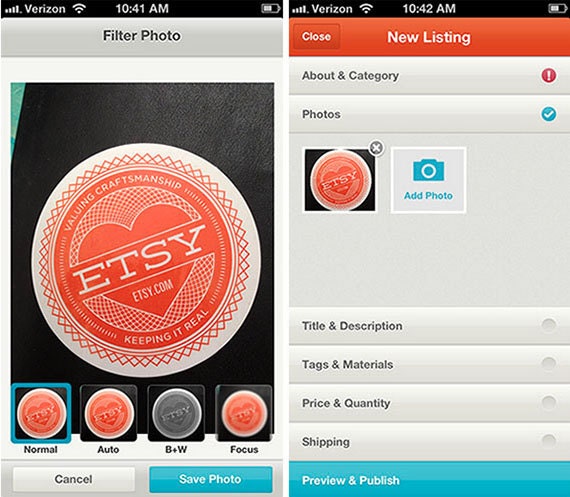
Hasil gambar untuk app Etsy

As we reported a few days ago, ETSY released their official app and as promised we’re back with a full review of the ETSY Android app.
If you’re not familiar with ETSY here’s the skinny. ETSY is a cool little site that lets crafty people sell their wares in shops. You can find anything from Yoda’s made out of Macramé to bottle cap earrings and 3000 dollar oil paintings. You can also find vintage goods as well as, but all vintage items have to be at least 20 years old. Needless to say ETSY is full of cool stuff, and the ETSY Android app lets you browse and buy.
Etsy for Android
The ETSY app is easy to navigate with the sites top-tier categories spread across the top along with a search button and your shopping cart. The featured sections are scrollable and cover items from different categories including gadgets, wedding, seasonal, kids, and supplies among others. The search tab lets you search the entire site and gives you access to all the categories.
If you see something you like you can put it in your cart, heart it or share it through the usual means. You can also browse users shops and save or follow any shops you really dig. ETSY is a pretty social site as far as sharing and favoriting things goes and the app handles all that nicely. If you do want to shop or save anything you will need an account, but they are free and easy to setup. Selling on the site is cheap as well and setting up a shop is free if you’re looking to sell crafted or vintage items.
ETSY Andriod App Screen
As a longtime ETSY user I’ve been looking forward to an official app for a while now. The app has a nice layout and it’s simple to use, overall they did a great job and I believe that consumers will really enjoy the app. I did have a few hiccups browsing photos at times, but nothing major.
The app feels properly designed for Android. Holo elements like the action bar, tabs, and scrolling are all implemented correctly. Although, it doesn't feel like a cookie cutter Holo app either. Oh, speaking of...  I wonder if I could find some Android cookie cutters on Etsy. If you decide to look for something obscure like that, the app's search interface works well. Load times and overall responsiveness are also killer
Hasil gambar untuk app Etsy
If you’re a seller like me you can browse your stock, but that’s about it unfortunately which sucks. As the app was just released hopefully they’ll add something for sellers in the future. The app is itself is solid though, and if you’re looking for cool stuff ETSY has you covered. You can pick up the official ETSY Android app for free on Google Play.

Wednesday, February 8, 2012

Milo

Hasil gambar untuk app shopping Milo

In addition to today’s availability of the enhanced eBay App for Android (now including selling functionality), Milo.com, a local shopping startup acquired by eBay in December 2010, today launched its iPhone app, called Milo Local Shopping. Milo’s new app helps people search the shelves of local stores, both at home and on-the-go. It’s the only app in the App Store that shows what nearby stores actually have a product in-stock, where the stores are located, and how the price at one store compares to another down the block. The app’s barcode scanner (using RedLaser technology) makes comparison shopping even easier – just scan a barcode and see whether a nearby store has the item for less.

Hasil gambar untuk app shopping Milo


Comparing in-store prices and finding out which local stores have specific items in stock is what Milo.com does, and something it does extremely well. Whether you're looking for an iPad, a pair of shoes, a new HDTV or a specific shirt Milo.com will help you find it in stock at a local retailer. Starting today, using Milo will be even better thanks to the free Milo Local Shopper app available on Android phones.

The new app brings everything the Milo.com website does into the palm of your hand, offering instant access to the prices of more than 3 million locally-available products at 50,000 stores, as well as real time stock information, allowing you to even narrow down to the exact color and size you want.

In addition to helping you figure out the best price and locations, the Milo Local Shopping app for Android provides access to product reviews and directions to the store. If the item stock is low, Milo will provide the store's phone number so you can make sure it is in stock.


Hasil gambar untuk app shopping Milo


Milo covers many big name stores like Target, Best Buy, Nordstrom, Toys R Us and many others which carry hot holiday items and will be offering Black Friday deals. 

In the announcement, Milo.com Founder and CEO Jack Abraham calls the new Milo Local Shopping app, "ideal for both the time-strapped and price-conscious shopper," when it comes to holiday shopping. 

Since the in-stock information is updated in real time, as fast as retailers update their website stock information, this app will be a must have for Black Friday, when lucky shoppers may find a leftover doorbuster item that eluded the early morning hordes. It will also be the easiest way to find the best price on the hottest gifts in stock at local retailers. 

The Milo Local Shopping app is a free download for Android phones and can be found by searching the Android Marketplace or visiting AppBrain.