Saturday, August 20, 2016

Poshmark


The phrase “broke college student” is no joke. We all know that life can be rough as it is but being a full-time or part-time student is a large financial leap that we all take and should be proud of. If you are like me, you are always trying to find ways to make some extra cash. I have found that selling my clothes is a great way to do just that. Going to consignment stores is always an option, but before you go selling or buying clothes at a consignment shop, take a look at this app called Poshmark.
Think virtual boutiques. Thousands, upon thousands of them. Poshmark is a way for people to connect with one another and recycle clothing and other items by selling them through a quick, fun and easy platform. Why not get rid of that sweater that you have worn once or twice and buy a new pair of shoes? Poshmark can be downloaded for free on the App Store for iPhones, and the Google Play Store for Android devices.
Hasil gambar untuk app Poshmark
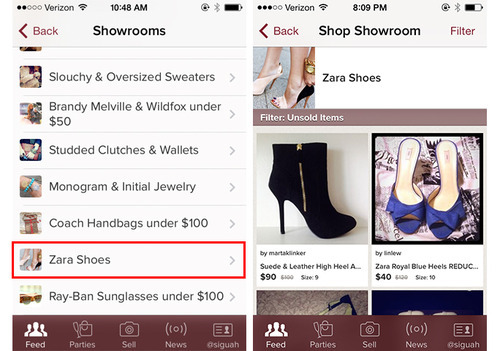
Everyone wants to know the condition of the item you are selling. Putting yourself in the buyer’s perspective is a must when posting pictures. Think about the flaws you would look out for in someone else’s closet. It is also important to make use of your creativity. You are more likely to have people gravitate towards your closet if you put some extra work in showcasing your items.
Listing your items is easy. Selecting the size, brand, and price takes only a few seconds. Poshmark allows the user to post pictures of whatever they may want to sell–accessories, wallets, handbags and jewelry– and post it to their followers. Followers can range from other Poshmark users, to Facebook, Twitter, Pinterest and Tumblr followers.
Once you have listed your item, a buyer will have the opportunity to make an offer, comment with any questions, like the listing and make a purchase.
Hasil gambar untuk app Poshmark
Poshmark allows for sellers to post their listings on virtual parties. These allow listings to be seen by anyone, follower or not. Parties are labeled for specific items. For example, “Best in Sweaters, Jackets, and More.”
Poshmark supplies the seller with a prepaid, printable USPS postage that makes it easy to print, package and send. Thus, there is a 4.99 delivery fee for using Poshmark.
When purchasing through the app, Poshmark keeps the payment safe until the package has been received and accepted. It really is just that simple.
Poshmark is an easy, fun, and quick way to turn around your closet, or make extra cash. It is a great alternative to other options around town.

Sunday, May 1, 2016

RedLaser

Hasil gambar untuk app RedLaser

The RedLaser app is designed to help you compare prices on any number of items by scanning a barcode with the iPhone’s camera. To start scanning items, tap the small lightning bolt icon on the bottom of the app and line up the barcode within the onscreen arrows provided by the app. When the arrows turn green, you've got the barcode properly positioned. You’ll see a "hold still for scan" message while the app does its magic. After the scan is complete, results pop up in one or two seconds.
I was super impressed with how quickly the RedLaser app posted its results. 
Unlike some other price-comparison apps I’ve reviewed, including the Shop.com app, RedLaser’s results pages are well organized. The app displays both online and local prices for the item you scanned, and you can toggle between the two screens of results (particularly helpful if you need the item right now and can't wait for it to be shipped to you).
Prices are displayed in large green numbers, and it’s easy to see how prices compare at a glance. Each price comes with a link to that store’s website, but whether those pages are optimized for the iPhone or not is dependent on the store, which can lead to some awkward experiences. RedLaser also includes a nifty feature where you can email your scanned items to view later.
The RedLaser scanner works remarkably well. The quality of barcode scanning apps generally comes down to two things: how well the scanner works and how quickly results appear. As noted earlier, results are fast. The scanner is great, too.
Once the product is located, the app displays prices for online and local retailers when available, as well as product details, reviews, and suggested complementary products (below). If customers see a price they are willing to pay, they can even buy it without leaving the app:

Hasil gambar untuk app RedLaser speaking keyword

The RedLaser scanner seems less vulnerable to movement than other shopping apps I've tested, so you don’t have to hold your hand quite as steady. I scanned dozens of items everything from vodka to store-brand multivitamins and the RedLaser app found a match every time. The scanner isn't perfect: it did have a harder time with glare on shiny or round objects, but you always can enter the UPC code by hand for hard-to-scan items. 
We still have two more shopping aid apps to evaluate. Today we look at Red Laser. This app is available for iPhone, Android, and Windows Phones. It is primarily a tool that helps customers find the best price for products while shopping. Customers can search for prices using a variety of input methods, including scanning a barcode or QR code, entering product keywords, taking a photo of the product of interest, or speaking keywords into the phone:


RedLaser is ​a great app to take along on your next shopping trip. The scanner does struggle a bit with glare, but that’s a problem you’ll encounter with any iPhone shopping app.
The RedLaser scanner is faster than most apps, and the price results are displayed in an organized fashion that makes it easy to compare prices. The inclusion of local prices in addition to online results is also a plus. 

Thursday, March 10, 2016

Shopular

Hasil gambar untuk app Shopular,

Many couponers tend to avoid the big malls whenever possible, because malls often have expensive stores that don’t offer coupons or deals. Even if some mall shops do have bargains, it can be hard to find out about them because most of these stores don’t have circulars or TV commercials announcing their current specials. If, for instance, your favorite fashion shop has a one-day sale offering 25 percent off everything, you may not find out about it until a friend shows you the adorable jacket she got at a deep discount -- but by that point you’ve missed the deal.
Fortunately, there is a way around this. The Shopular app can give you the lowdown on which stores have the best deals, coupons, and sales at any given time.
Hasil gambar untuk app Shopular,
Love Tory Burch, True Religion Jeans, Neiman Marcus, and Coach purses, but you never come across deals on them?
Then Shopular is your new best friend.

The Shopular app goes where many of your favorite tried-and-true couponing apps don’t venture. It gathers the latest deals from stores like Abercrombie & FitchHollister, and the stores listed above. You’ll find everything from coupons to “one day only” sales, to updates on when particular deals end.


When you log into the app, it will ask if it can track your location (like many apps do), and then it will offer you an option of filtering the deals based on your local malls. A list of malls will come up, and you can click on the one you plan to visit so you can see the very best offers there.

The stores that have money-saving coupons available will show a red stripe in the upper right-hand corner of the offer (as shown in the photo above on the deals for Hollister, Aeropostale, and Coldwater Creek.) The stores with other deals, such as discounts on certain items or deep discounts on all clearance, will just be listed without the red stripe.

Hasil gambar untuk app Shopular,

In addition, if you want to find out whether your favorite shop is having a sale, you can click the magnifying glass in the upper right-hand corner of the app and then search for a store by name. You can click on the "heart" symbol on any particular coupon or deal, and then it will be added to your personal deals list. To access that, just tap the icon at the top of the page that has a heart with a circle around it followed by the word "list."

One of the coolest things about this app is that it has a link to the week's circulars.

This is helpful for me because it always seems like I have no plans to visit a particular store, so I send the corresponding circular into my recycle bin...only to find that I need to hit that store later in the week but have no circular.

Overall, I find Shopular to be incredibly useful for those treks to the mall. You'll save money on high-end brands that may have cost you full price in the past.

Monday, January 4, 2016

Shop Savvy

Hasil gambar untuk ShopSavvy

Never overpay for a product again! ShopSavvy makes it easy to price match nearly anything. Use the app to scan the barcode of any product you’re considering purchasing, and ShopSavvy will let you know if the product is available at a lower price at another local retailer, or even online. If the product is cheaper somewhere else, you can buy it there, or with so many brick and mortar retailers price matching these days, you can probably save a good chunk of change right there in the store. ShopSavvy also allows you to track deals, receive sales alerts, check product reviews, and more. Don’t waste your money! Shop savvy!

First, I want to mention the practicality of having a barcode scanner on your iDevice. I’m sure you’ve noticed the QR codes we place at the bottom of our reviews, and the reason we do so is it allows you to quickly access an app we’re reviewing without having to search for it in the App Store or download it on your computer. Barcode scanners are also helpful with comparison shopping, creating grocery lists, remembering products to buy, and a whole slew of other things.

Hasil gambar untuk ShopSavvy

ShopSavvy (Barcode Scanner and QR Code Reader), developed by ShopSavvy, Inc, is definitely an App Store veteran. Combining an intuitive interface with a database of products that can’t be beat, ShopSavvy is a must for anyone who uses their iPhone, iPod Touch, and/or iPad for shopping.

Concept and Functionality:

I’m going to admit that I’ve been a huge fan of ShopSavvy since it first came out. It was one of the first barcode scanning apps I ever downloaded on my prehistoric iPhone 3G. Even with the mediocre camera on my first iPhone, ShopSavvy was able to outperform similar apps. In the years since, ShopSavvy definitely hasn’t lost its touch.
ShopSavvy does all of the things mentioned above and more, and it’s extremely simple to use. When you open the app, you have the option to create an account so you can easily keep track of your activity and store payment information. You don’t need an account to use the app, however, which is great news for users who aren’t keen on the idea.
To scan a barcode, simply press the “Scan” button on the bottom of the screen and focus your camera on the code. Depending on what you’re scanning (website or product), ShopSavvy will either take you directly to the website or show you a detailed product information screen. From here, you can read product reviews, add the scanned product to a list, compare prices both online and locally, and even purchase the product directly in the app.
Hasil gambar untuk ShopSavvy
To help you keep track of items you’ve scanned with ShopSavvy, there’s a useful “History” page. However, it only works with products that you scan, not websites or app QR codes (like you see here). While this isn’t too big of a deal, I still think it’d be handy to allow both products and sites to be stored in this section.
Features:
ShopSavvy is packed with features which make it the Swiss Army knife of mobile shopping. If you’re looking for a product locally, the app provides directions to the store of your choice and even tells you if the product is in stock.
ShopSavvy also features a long list of deals and special offers available at many popular retail stores. This includes coupon codes, shipping discounts, and sales on products. While the list of deals and offers isn’t as comprehensive as other services, it’s still valuable and worth browsing.
As far as barcode compatibility, ShopSavvy can scan UPC, EAN, and QR codes. In layman’s terms, this means that basically every barcode you encounter can be scanned with the app. As I mentioned before, you can even purchase items within ShopSavvy using the Wallet feature.
Lastly, you can search for products by keyword if a barcode isn’t available. Unfortunately this is the only feature that I’m not a huge fan of, mainly because results tend to be very scattered and there can be multiple versions of the same product. It would be great if users could choose specific stores to search, which I believe would help to reduce query clutte.
Value:
I can’t say enough great things about ShopSavvy. Not only will it save you money while shopping, but you can’t beat the price of a free app. Whether you’re an online shopping whiz, looking for an easy way to keep track of products, or yearning to put those QR codes at the bottom or our reviews to use, ShopSavvy is definitely the way to go.